
Running inference tools#
This is a rendered copy of mltools.ipynb. You can optionally run it interactively on binder at this link
As machine learning (ML) becomes more popular in HEP analysis, coffea also
provide tools to assist with using ML tools within the coffea framework. For
training and validation, you would likely need custom data mangling tools to
convert HEP data formats (NanoAOD, PFNano) to a format that
best interfaces with the ML tool of choice, as for training and validation, you
typical want to have fine control over what computation is done. For more
advanced use cases of data mangling and data saving, refer to the awkward array
manual and uproot/parquet write
operations for saving intermediate states. The helper tools provided in coffea
focuses on ML inference, where ML tool outputs are used as another variable to
be used in the event/object selection chain.
Why these wrapper tools are needed#
Warning: This notebook is only relevant if you are using coffea in “dask” mode with dask-awkward#
The typical operation of using ML inference tools in the awkward/coffea analysis
tools involves the conversion and padding of awkward array to ML tool containers
(usually something that is numpy-compatible), run the inference, then
convert-and-truncate back into the awkward array syntax required for the
analysis chain to continue. With awkward arrays’ laziness now being handled
entirely by dask, the conversion operation of awkward array to
other array types needs to be wrapped in a way that is understandable to dask.
The packages in the ml_tools package attempts to wrap the common tools used by
the HEP community with a common interface to reduce the verbosity of the code on
the analysis side.
Example using ParticleNet-like jet variable calculation using PyTorch (GNN)#
The example given in this notebook be using pytorch to calculate a
jet-level discriminant using its constituent particles. An example for how to
construct such a pytorch network can be found in the docs file, but for
mltools in coffea, we only support the TorchScript format files to
load models to ensure operability when scaling to clusters. Let us first start
by downloading the example ParticleNet model file and a small PFNano
compatible file, and a simple function to open the PFNano with and without
dask.
!wget --quiet -O model.pt https://github.com/scikit-hep/coffea/raw/master/tests/samples/triton_models_test/pn_test/1/model.pt
!wget --quiet -O pfnano.root https://github.com/scikit-hep/coffea/raw/master/tests/samples/pfnano.root
from coffea.nanoevents import NanoEventsFactory
from coffea.nanoevents.schemas import PFNanoAODSchema


def open_events():
    factory = NanoEventsFactory.from_root(
        {"file:./pfnano.root": "Events"},
        schemaclass=PFNanoAODSchema,
        mode="dask",
    )
    return factory.events()
Now we prepare a class to handle inference request by extending the
mltools.torch_wrapper class. As the base class cannot know anything about the
data mangling required for the users particular model, we will need to overload
at least the method prepare_awkward:
The input can be an arbitrary number of awkward arrays or dask awkward array (but never a mix of dask/non-dask array). In this example, we will be passing in the event array.
The output should be single tuple
a+ single dictionaryb, this is to ensure that arbitrarily complicated outputs can be passed to the underlyingpytorchmodel instance likemodel(*a, **b). The contents ofaandbshould benumpy-compatible awkward-like arrays: if the inputs are non-dask awkward arrays, the return should also be non-dask awkward arrays that can be trivially converted tonumpyarrays via aak.to_numpycall; if the inputs are dask awkward arrays, the return should be still be dask awkward arrays that can be trivially converted via ato_awkward().to_numpy()call.In this ParticleNet-like example, the model expects the following inputs:
A
Njets x2coordinate x100constituents “points” array, representing the constituent coordinates.A
Njets x5feature x100constituents “features” array, representing the constituent features of interest to be used for inference.A
Njets x1mask x100constituent “mask” array, representing whether a constituent should be masked from the inference request.
In this case, we will need to flatten the
Eevents xNjets structure, then, we will need to stack the constituent attributes of interest viaak.concatenateinto a single array.
After defining this minimum class, we can attempt to run inference using the
__call__ method defined in the base class.
from coffea.ml_tools.torch_wrapper import torch_wrapper
import awkward as ak
import dask_awkward
import numpy as np


class ParticleNetExample1(torch_wrapper):
    def prepare_awkward(self, events):
        jets = ak.flatten(events.Jet)

        def pad(arr):
            return ak.fill_none(
                ak.pad_none(arr, 100, axis=1, clip=True),
                0.0,
            )

        # Human readable version of what the inputs are
        # Each array is a N jets x 100 constituent array
        imap = {
            "points": {
                "deta": pad(jets.eta - jets.constituents.pf.eta),
                "dphi": pad(jets.delta_phi(jets.constituents.pf)),
            },
            "features": {
                "dr": pad(jets.delta_r(jets.constituents.pf)),
                "lpt": pad(np.log(jets.constituents.pf.pt)),
                "lptf": pad(np.log(jets.constituents.pf.pt / jets.pt)),
                "f1": pad(np.log(np.abs(jets.constituents.pf.d0) + 1)),
                "f2": pad(np.log(np.abs(jets.constituents.pf.dz) + 1)),
            },
            "mask": {
                "mask": pad(ak.ones_like(jets.constituents.pf.pt)),
            },
        }

        # Compacting the array elements into the desired dimension using
        # ak.concatenate
        retmap = {k: ak.concatenate([x[:, np.newaxis, :] for x in imap[k].values()], axis=1) for k in imap.keys()}

        # Returning everything using a dictionary. Also perform type conversion!
        return (), {
            "points": ak.values_astype(retmap["points"], "float32"),
            "features": ak.values_astype(retmap["features"], "float32"),
            "mask": ak.values_astype(retmap["mask"], "float16"),
        }


# Setting up the model container
pn_example1 = ParticleNetExample1("model.pt")

# Running on dask_awkward array
dask_events = open_events()
dask_results = pn_example1(dask_events)
print("Dask awkward results:", dask_results.compute())  # Runs file!
2026-03-06 14:17:34.315771: I tensorflow/core/util/port.cc:153] oneDNN custom operations are on. You may see slightly different numerical results due to floating-point round-off errors from different computation orders. To turn them off, set the environment variable `TF_ENABLE_ONEDNN_OPTS=0`.
2026-03-06 14:17:34.439321: I tensorflow/core/platform/cpu_feature_guard.cc:210] This TensorFlow binary is optimized to use available CPU instructions in performance-critical operations.
To enable the following instructions: AVX2 AVX512F AVX512_VNNI FMA, in other operations, rebuild TensorFlow with the appropriate compiler flags.
2026-03-06 14:17:37.242603: I tensorflow/core/util/port.cc:153] oneDNN custom operations are on. You may see slightly different numerical results due to floating-point round-off errors from different computation orders. To turn them off, set the environment variable `TF_ENABLE_ONEDNN_OPTS=0`.
/home/user/.conda/envs/pyhep-dev/lib/python3.13/site-packages/coffea/nanoevents/schemas/nanoaod.py:283: RuntimeWarning: Missing cross-reference index for LowPtElectron_electronIdx => Electron
  warnings.warn(
/home/user/.conda/envs/pyhep-dev/lib/python3.13/site-packages/coffea/nanoevents/schemas/nanoaod.py:283: RuntimeWarning: Missing cross-reference index for LowPtElectron_genPartIdx => GenPart
  warnings.warn(
/home/user/.conda/envs/pyhep-dev/lib/python3.13/site-packages/coffea/nanoevents/schemas/nanoaod.py:283: RuntimeWarning: Missing cross-reference index for LowPtElectron_photonIdx => Photon
  warnings.warn(
/home/user/.conda/envs/pyhep-dev/lib/python3.13/site-packages/coffea/nanoevents/schemas/nanoaod.py:322: RuntimeWarning: Branch Photon_mass already exists but its values will be replaced with 0.0
  warnings.warn(
/home/user/.conda/envs/pyhep-dev/lib/python3.13/site-packages/coffea/nanoevents/schemas/nanoaod.py:322: RuntimeWarning: Branch Photon_charge already exists but its values will be replaced with 0.0
  warnings.warn(
/home/user/.conda/envs/pyhep-dev/lib/python3.13/site-packages/coffea/ml_tools/helper.py:175: UserWarning: No format checks were performed on input!
  warnings.warn("No format checks were performed on input!")
Dask awkward results: [[0.0693, -0.0448], [0.0678, -0.0451], ..., [0.0616, ...], [0.0587, -0.0172]]
For each jet in the input to the torch model, the model returns a 2-tuple
probability value. Without additional specification, the torch_wrapper class
performs a trival conversion of ak.from_numpy of the torch model’s output. We
can specify that we want to fold this back into nested structure by overloading
the postprocess_awkward method of the class.
For the ParticleNet example we are going perform additional computation for the conversion back to awkward array formats:
Calculate the
softmaxmethod for the return of each jet (commonly used as the singular ML inference “scores”)Fold the computed
softmaxarray back into nested structure that is compatible with the original events.Jet array.
Notice that the inputs of the postprocess_awkward method is different from the
prepare_awkward method, only by that the first argument is the return array
of the model inference after the trivial from_numpy conversion. Notice that
the return_array is a dask array.
class ParticleNetExample2(ParticleNetExample1):
    def postprocess_awkward(self, return_array, events):
        softmax = np.exp(return_array)[:, 0] / ak.sum(np.exp(return_array), axis=-1)
        njets = ak.count(events.Jet.pt, axis=-1)
        return ak.unflatten(softmax, njets)


pn_example2 = ParticleNetExample2("model.pt")

# Running on dask awkward
dask_events = open_events()
dask_jets = dask_events.Jet
dask_jets["MLresults"] = pn_example2(dask_events)
dask_events["Jet"] = dask_jets
print(dask_events.Jet.MLresults.compute())
/home/user/.conda/envs/pyhep-dev/lib/python3.13/site-packages/dask_awkward/lib/structure.py:910: UserWarning: Please ensure that dask.awkward<count, type='## * int64', npartitions=1>
        is partitionwise-compatible with dask.awkward<divide, type='## * float32', npartitions=1>
        (e.g. counts comes from a dak.num(array, axis=1)),
        otherwise this unflatten operation will fail when computed!
  warnings.warn(f"""Please ensure that {counts}
[[0.528, 0.528, 0.524, 0.523, 0.521, 0.52, 0.519, 0.519], ..., [0.528, ...]]
Of course, the implementation of the classes above can be written in a single class. Here is a copy-and-paste implementation of the class with all the functionality described in the cells above:
class ParticleNetExample(torch_wrapper):
    def prepare_awkward(self, events):
        jets = ak.flatten(events.Jet)

        def pad(arr):
            return ak.fill_none(
                ak.pad_none(arr, 100, axis=1, clip=True),
                0.0,
            )

        # Human readable version of what the inputs are
        # Each array is a N jets x 100 constituent array
        imap = {
            "points": {
                "deta": pad(jets.eta - jets.constituents.pf.eta),
                "dphi": pad(jets.delta_phi(jets.constituents.pf)),
            },
            "features": {
                "dr": pad(jets.delta_r(jets.constituents.pf)),
                "lpt": pad(np.log(jets.constituents.pf.pt)),
                "lptf": pad(np.log(jets.constituents.pf.pt / jets.pt)),
                "f1": pad(np.log(np.abs(jets.constituents.pf.d0) + 1)),
                "f2": pad(np.log(np.abs(jets.constituents.pf.dz) + 1)),
            },
            "mask": {
                "mask": pad(ak.ones_like(jets.constituents.pf.pt)),
            },
        }

        # Compacting the array elements into the desired dimension using
        # ak.concatenate
        retmap = {k: ak.concatenate([x[:, np.newaxis, :] for x in imap[k].values()], axis=1) for k in imap.keys()}

        # Returning everything using a dictionary. Also take care of type
        # conversion here.
        return (), {
            "points": ak.values_astype(retmap["points"], "float32"),
            "features": ak.values_astype(retmap["features"], "float32"),
            "mask": ak.values_astype(retmap["mask"], "float16"),
        }

    def postprocess_awkward(self, return_array, events):
        softmax = np.exp(return_array)[:, 0] / ak.sum(np.exp(return_array), axis=-1)
        njets = ak.count(events.Jet.pt, axis=-1)
        return ak.unflatten(softmax, njets)


pn_example = ParticleNetExample("model.pt")

# Running on dask awkward arrays
dask_events = open_events()
dask_jets = dask_events.Jet
dask_jets["MLresults"] = pn_example(dask_events)
dask_events["Jet"] = dask_jets
print(dask_events.Jet.MLresults.compute())

print(dask_awkward.necessary_columns(dask_events.Jet.MLresults))
[[0.528, 0.528, 0.524, 0.523, 0.521, 0.52, 0.519, 0.519], ..., [0.528, ...]]
{'from-uproot-47eb709840fec52fd10150d70953b584': frozenset({'nJetPFCands', 'PFCands_eta', 'Jet_eta', 'JetPFCands_pFCandsIdx', 'PFCands_pt', 'nJet', 'Jet_nConstituents', 'PFCands_dz', 'nPFCands', 'Jet_pt', 'PFCands_d0', 'Jet_phi', 'PFCands_phi'})}
In particular, analyzers should check that the last line contains only the branches required for ML inference; if there are many non-required branches, this may lead the significant performance penalties.
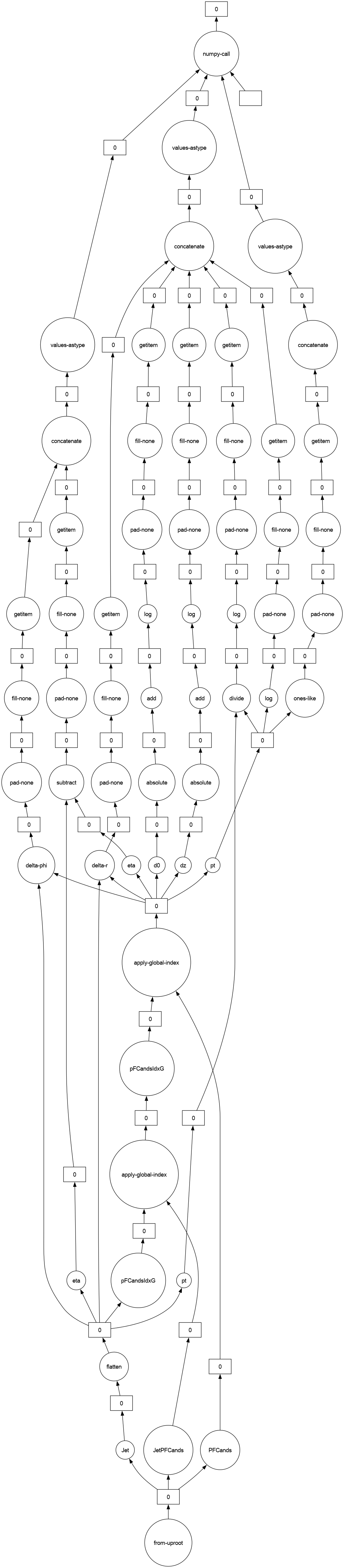
As per other dask tools, the users can extract how dask is analyzing the processing the computation routines using the following snippet.
print(dask_results.dask)
dask_results.visualize(optimize_graph=False)
HighLevelGraph with 60 layers.
<dask.highlevelgraph.HighLevelGraph object at 0x7f65af396750>
 0. from-uproot-47eb709840fec52fd10150d70953b584
 1. JetPFCands-93ce904d704e6b0eb3c3611bc8012f23
 2. PFCands-a323ca705b8fb497fce02c20c48e0775
 3. Jet-db85a47250c2b4ce6711ac6330a68642
 4. flatten-4889a76665bf011ef8bfe5caf341a473
 5. pt-a7f1f2e39a4683dcbf04ac86cd2b629a
 6. pFCandsIdxG-1b2dc2381cac56c6fea27b4e6f80c7c9
 7. apply-global-index-83c3596bb07c3af7deae8faffbaf988b
 8. pFCandsIdxG-5497ab84ba195cc82f0c9faf0b3f5b45
 9. apply-global-index-f580a120d51d493f2dad8c3d79ffea4d
 10. dz-400ad7809b8ed1f44d54007c37369688
 11. absolute-3e3dc92259671b9b6be671adf0256ce8
 12. add-5ab2ed8482238618983c9440f356e267
 13. log-bd0cfe7adc092da2616ac80138f7e5ac
 14. pad-none-41c06a8d9bf83a4e367ecd8be1f6a263
 15. fill-none-8fe2ee90aff2b5e0e40c2d01f0306ca5
 16. getitem-3179aa4caeebe8231407f172df23f045
 17. d0-e4607a28ac15162b31902690392abc77
 18. absolute-fce9cff24d7e6d8f5c9aa86647211181
 19. add-8c1592b6dc2c04daeff5bd42898ee640
 20. log-e54e48a582a534962b32284866c59225
 21. pad-none-36d2ae59ae6597ba9edf54e44b9d106a
 22. fill-none-c3d089fa8dbf368fd82ec31f9f4dde26
 23. getitem-e32d1fba54f123eefaf9246b21a5284a
 24. pt-864f937fba16a8f51a852a09c6957e8e
 25. ones-like-7d3e18113c42c2f7eb59ae893d2a0848
 26. pad-none-5e44824da2ddf1b91b85a3c965cb5aca
 27. fill-none-d446d0f7ab5d95f9f3db04b9fad75176
 28. getitem-10444e5f75a23991561f8fee4de9d409
 29. concatenate-axisgt0-3ad5a459a18b7b3babf732bee0525611
 30. values-astype-4d50bc83bb403fcdd27a3b65d85c366a
 31. divide-a1b156817cfe4d18ed46c178d8990709
 32. log-4322e4e35c666e9caf144371a660a2c0
 33. pad-none-848d3acd37fcb95a7032c0728e0bc2bd
 34. fill-none-3e8e46a7126043a2048c736586559c88
 35. getitem-a6f40f0490cce2d1b36e08756aa0986f
 36. log-71fa712a521459f78a0a5a52f6c4caeb
 37. pad-none-3b2e4b992e560a86310288d920ee5760
 38. fill-none-6b50927204b3005ce962629607402e99
 39. getitem-bc6f2264e356f598c4c11d4a8924ee49
 40. delta-r-d01755278d68edb56dd7a8864f08c41f
 41. pad-none-a83bf4800e55a6a0f87d78c6a1c20734
 42. fill-none-65a2907dfa66e4d2d622adbc472a0c5c
 43. getitem-a3cd291794ae4faad32e98092256f92b
 44. concatenate-axisgt0-52dbd7f985f805d6e4a04104b92ff501
 45. values-astype-71dfe331418a143b2170cdb31d6f461f
 46. delta-phi-5d132804c871d61779a862ecd457e589
 47. pad-none-d57ed00997cd78d1dc855e97cd994c08
 48. fill-none-70b40e432c084a4f37f17c730ebcb622
 49. getitem-03692ccd8cef35e8e1595dcdf6eae807
 50. eta-eec42bdafe9dfffc8150485b6c12ffba
 51. eta-76779e358379066553c007ca945b02ae
 52. subtract-78dc570ad02bf35a5cb1817f625d77a8
 53. pad-none-39014f00546a913375d0321b8069cb9c
 54. fill-none-9b9efb8edb88e140f552c9088f72b01c
 55. getitem-9ced049f137c1e8e108441c6e69fe162
 56. concatenate-axisgt0-2ff28f8af0e7ac95e5cd1d37eac9ba0d
 57. values-astype-13cbf019732fdb2439111c65f031e111
 58. ParticleNetExample1-124b2dc1-cb2f-4ea7-95ad-65b9e746bbee
 59. numpy-call-ParticleNetExample1-5dd0e5f80a2d9d05623cc83aec76c3d2
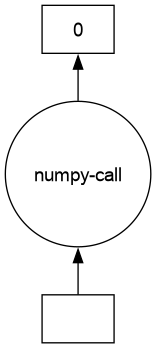
Or a peek at the optimized results:
dask_results.visualize(optimize_graph=True)
/home/user/.conda/envs/pyhep-dev/lib/python3.13/site-packages/coffea/ml_tools/helper.py:175: UserWarning: No format checks were performed on input!
  warnings.warn("No format checks were performed on input!")
Example using ParticleNet-like jet variable calculation using PyTorch (DNN)#
In this example, we will do the same operation as shown above, but using a simple vanilla DNN
import torch
import torch.nn as nn
import torch.nn.functional as F

"""
Define the DNN
"""
class Net(nn.Module):
    def __init__(self, input_shape):
        super(Net, self).__init__()
        self.fc1 = nn.Linear(input_shape, 128)
        self.bn1 = nn.BatchNorm1d(128)
        self.dropout1 = nn.Dropout(0.2)
        self.fc2 = nn.Linear(128, 64)
        self.bn2 = nn.BatchNorm1d(64)
        self.dropout2 = nn.Dropout(0.2)
        self.fc3 = nn.Linear(64, 32)
        self.bn3 = nn.BatchNorm1d(32)
        self.dropout3 = nn.Dropout(0.2)
        self.output = nn.Linear(32, 1)

    def forward(self, features):
        x = features
        x = self.fc1(x)
        x = self.bn1(x)
        x = F.tanh(x)
        x = self.dropout1(x)

        x = self.fc2(x)
        x = self.bn2(x)
        x = F.tanh(x)
        x = self.dropout2(x)

        x = self.fc3(x)
        x = self.bn3(x)
        x = F.tanh(x)
        x = self.dropout3(x)

        x = self.output(x)
        output = F.sigmoid(x)
        return output
"""
Initialize and save the DNN. Normally, we would first train the DNN before saving.
"""
n_feat = 5
dummy_integer = 100
model = Net(n_feat)
model.eval()  # put in eval mode for BatchNorm1d and Dropout
input_arr = torch.rand(dummy_integer, n_feat)  # intialize a dummy input to generate torch graph for torch.jit to trace
torch.jit.trace(model, input_arr).save("test_model.pt")
from coffea.ml_tools.torch_wrapper import torch_wrapper


def open_events():
    factory = NanoEventsFactory.from_root(
        {"file:./pfnano.root": "Events"},
        schemaclass=PFNanoAODSchema,
        mode="dask",
    )
    return factory.events()


class DNNWrapper(torch_wrapper):
    def prepare_awkward(self, arr):
        # The input is any awkward array with matching dimension
        # Last time we added our input in a dictionary, but with a simple DNN, just add it to a list
        return [
            ak.values_astype(arr, "float32"),  # only modification we do is is force float32
        ], {}


events = open_events()
input = ak.concatenate(  # Fold 5 event-level variables into a singular array
    [
        events.event[:, np.newaxis],
        events.MET.sumEt[:, np.newaxis],
        events.MET.significance[:, np.newaxis],
        events.event[:, np.newaxis],
        events.event[:, np.newaxis],
    ],
    axis=1,
)
dwrap = DNNWrapper("test_model.pt")
output = dwrap(input)
print(output)  # This is the lazy evaluated dask array! Use this directly for histogram filling
print(f"coffea DNN output: {output.compute()}")  # Eagerly evaluated resut
/home/user/.conda/envs/pyhep-dev/lib/python3.13/site-packages/coffea/nanoevents/schemas/nanoaod.py:283: RuntimeWarning: Missing cross-reference index for LowPtElectron_electronIdx => Electron
  warnings.warn(
/home/user/.conda/envs/pyhep-dev/lib/python3.13/site-packages/coffea/nanoevents/schemas/nanoaod.py:283: RuntimeWarning: Missing cross-reference index for LowPtElectron_genPartIdx => GenPart
  warnings.warn(
/home/user/.conda/envs/pyhep-dev/lib/python3.13/site-packages/coffea/nanoevents/schemas/nanoaod.py:283: RuntimeWarning: Missing cross-reference index for LowPtElectron_photonIdx => Photon
  warnings.warn(
/home/user/.conda/envs/pyhep-dev/lib/python3.13/site-packages/coffea/nanoevents/schemas/nanoaod.py:322: RuntimeWarning: Branch Photon_mass already exists but its values will be replaced with 0.0
  warnings.warn(
/home/user/.conda/envs/pyhep-dev/lib/python3.13/site-packages/coffea/nanoevents/schemas/nanoaod.py:322: RuntimeWarning: Branch Photon_charge already exists but its values will be replaced with 0.0
  warnings.warn(
/home/user/.conda/envs/pyhep-dev/lib/python3.13/site-packages/coffea/ml_tools/helper.py:175: UserWarning: No format checks were performed on input!
  warnings.warn("No format checks were performed on input!")
dask.awkward<numpy-call-DNNWrapper, type='## * 1 * float32', npartitions=1>
coffea DNN output: [[0.575], [0.575], [0.575], [0.575], ..., [0.575], [0.575], [0.575], [0.576]]
"""
Sanity check that the DNN wrapper is giving the same outputs
"""
test_input = torch.from_numpy(ak.to_numpy(input.compute())).float()
print(f"normal DNN output: {model(test_input).detach().numpy()}")
normal DNN output: [[0.57533765]
 [0.57533765]
 [0.57533765]
 [0.57533765]
 [0.57533765]
 [0.57533765]
 [0.57533765]
 [0.57533765]
 [0.57533765]
 [0.57593334]]
Additional comments on common prepare_awkward patterns#
The key requirement of all wrapper classes in ml_tools package, is that to convert
awkward arrays into numpy-compatible formats using just awkward related tools,
which ensures that no eager data conversion is performed on dask arrays. Below are
some common patterns that are useful when defining a user-level class.
Casting multiple fields a collection to be separate axis#
Given our collection of particles of length $N$, our tool is interested in just a
subset of fields is to be represented as an $N\times M$ array. You can achieve this
using just ak.concatenate and dimension expansion with np.newaxis.
events = open_events().compute() # Using eagar array as example
fields_of_interest = ["MET", "TkMET", "RawMET"] # Example of using 3 MET pt values types as a single input
event_np_array = ak.concatenate(
    [
        events[field].pt[:,np.newaxis] # Expanding length N array to Nx1
        for field in fields_of_interest
    ],
    axis=1,
) # This should now be a Nx3 array
print(event_np_array, event_np_array.type)
[[60.9, 504, 14.2], [51, 1.23e+03, 35.8], ..., [167, ...], [30.8, 260, 37.6]] 10 * 3 * float32
Fixing collection dimensions#
Many ML inference tools work with fixed dimension inputs, with missing entries
being set to a placeholder values. A common method for achieving this in awkward
is with pad_none/fill_none calls, for example to pad the number of particles
passed to the inference tool in each event to be a fixed length of 64. Notice
that elements beyond the bad length would be truncated.
part_padded = ak.fill_none(
    ak.pad_none(events.Jet.pt, 64, axis=1, clip=True),
    -1000, # Placeholder value
    axis=1,
)
print(part_padded, part_padded.type)
[[1.68e+03, 1.41e+03, 298, 85.9, ..., -1e+03, -1e+03, -1e+03, -1e+03], ...] 10 * 64 * float64
Fixing None-able arrays#
When input arrays are computed using certain awkward array methods, arrays may be
reserved to allow for None values, even if the actual data cannot contain None.
For example, when using ak.firsts to extract the leading jet pt of events, because
the awkward function itself has no knowledge of the actual number of jets in each
event, it will need to reserve the return array as potentially containing None,
even if the analyzer has enforced via prior event selections or event skimming
such that None values are not possible.
# Taking the leading jet of the first 5 events
leading_jet = ak.firsts(events.Jet)[:5]
# Notice the none-able type of the array indicated as ?float32, despite all
# values being not None.
print(leading_jet.pt.type, leading_jet.pt)
5 * ?float32[parameters={"__doc__": "pt", "typename": "float[]"}] [1.68e+03, 1.61e+03, 1.68e+03, 1.52e+03, 1.6e+03]
These arrays are not always compatible with the wrapped tool provided in the
ml_tools package. The error that is generated by the wrapped tool when it
encounters a None-able array is, unfortunately, also not very descriptive, usually
a long stacktrace that ends with something like:
File ".../site-packages/awkward/_nplikes/array_module.py", line 85, in frombuffer
    return self._module.frombuffer(buffer, dtype=dtype, count=count)
ValueError: buffer is smaller than requested size
To fix such errors, one can either use the ak.fill_none method mentioned in the
previous section to enforce the return array never contains None values, or use
the ak.enforce_type method, which can also be used to cast arrays to a specific
type or floating point precision:
print("fill_none:", ak.fill_none(ak.firsts(events.Jet.pt), -1 ).type)
print("enforce_type:", ak.enforce_type(ak.firsts(events.Jet.pt), "float32").type)
fill_none: 10 * float64
enforce_type: 10 * float32
Length-zero arrays#
In HEP analysis, a common routine will have you working with length-zero array in
individual chunks (ex. when running the primarily selection workflow for background
events). In these cases, you need to make sure the inference library that you are
using behaves as expected when processing length-zero arrays. Ideally, all the
upstream libraries should handle length-zero arrays correct, but in the edges cases
where your model using a more exotic functions is causing issues, the wrappings in the
ml_tools package has some mechanisms that can help handle such situations:
tf_wrapper/tensorflow: theskip_length_zeroflag can be passed to thetf_wrapperconstructor. When this is set toTrue, when a length-0 array is detected to be the input, the wrapper will generate a length 0 numpy array instead of attempting to pass the input for inference.torch_wrapper/pytorch: as the output format ofpytorchmodels is difficult to implement detect at runtime without additional input, if you need to skip length-zero inputs, the analysts must provide the shape of the output in theexpected_output_shapeargument of thetorch_wrapperconstructor. Notice that the shape should be in the format of thenumpy.array.shapeoutput of nominal return values, with the first argument substituted to be aNoneto indicate arbitrary length.triton_wrapper/triton: Length-zero is handled automatically by the internal batching process. No additional user input is required.xgboost_wrapper/xgboost: Length-zero should always be handled by the underlyingxgboostlibrary. No additional user input is required.
Comments about generalizing to other ML tools#
All ML wrappers provided in the
coffea.mltoolsmodule (triton_wrapperfor triton server inference,torch_wrapperfor pytorch,xgboost_wrapperfor xgboost inference,tf_wrapperfor tensorflow) follow the same design: analyzers is responsible for providing the model of interest, along with providing an inherited class that overloads of the following methods to data type conversion:prepare_awkward: converting awkward arrays tonumpy-compatible awkward arrays, the output arrays should be in the format of a tupleaand a dictionaryb, which can be expanded out to the input of the ML tool likemodel(*a, **b). Notice some additional trivial conversion, such as the conversion to available kernels forpytorch, converting to a matrix format forxgboost, and slice of array fortritonis handled automatically by the respective wrappers.postprocess_awkward(optional): converting the trivial converted numpy array results back to the analysis specific format. If this is not provided, then a simpleak.from_numpyconversion results is returned.If the ML tool of choice for your analysis has not been implemented by the
coffea.mltoolsmodules, consider constructing your own with the providednumpy_call_wrapperbase class incoffea.mltools. Aside from the functions listed above, you will also need to provide thenumpy_callmethod to perform any additional data format conversions, and call the ML tool of choice. If you think your implementation is general, also consider submitting a PR to thecoffearepository!