
Coffea concepts#
This page explains concepts and terminology used within the coffea package. It is intended to provide a high-level overview, while details can be found in other sections of the documentation.
Columnar analysis#
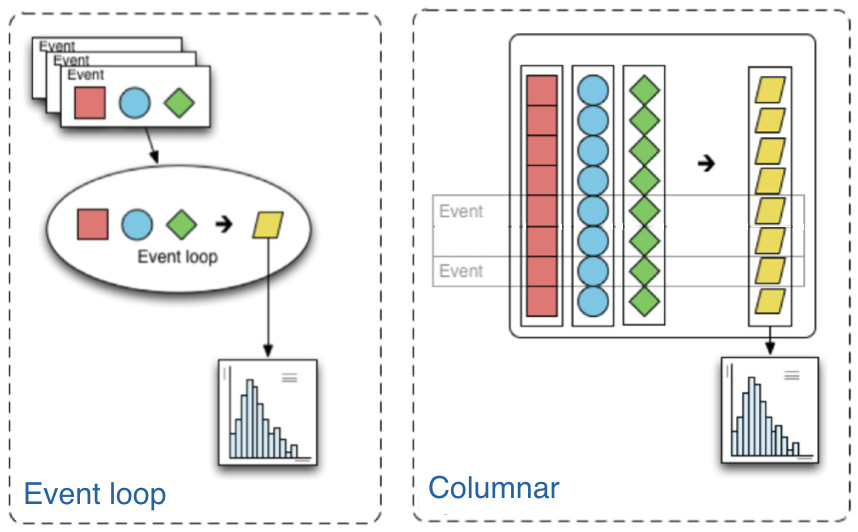
Columnar analysis is a paradigm that describes the way the user writes the analysis application that is best described in contrast to the traditional paradigm in high-energy particle physics (HEP) of using an event loop. In an event loop, the analysis operates row-wise on the input data (in HEP, one row usually corresponds to one reconstructed particle collision event.) Each row is a structure containing several fields, such as the properties of the visible outgoing particles that were reconstructed in a collision event. The analysis code manipulates this structure to either output derived quantities or summary statistics in the form of histograms. In contrast, columnar analysis operates on individual columns of data spanning a chunk (partition, batch) of rows using array programming primitives in turn, to compute derived quantities and summary statistics. Array programming is widely used within the scientific python ecosystem, supported by the numpy library. However, although the existing scientific python stack is fully capable of analyzing rectangular arrays (i.e. no variable-length array dimensions), HEP data is very irregular, and manipulating it can become awkward without first generalizing array structure a bit. The awkward package does this, extending array programming capabilities to the complexity of HEP data.
Coffea processor#
In almost all HEP analyses, each row corresponds to an independent event, and it is exceptionally rare
to need to compute inter-row derived quantities. This makes horizontal scale-out straightforward: each chunk of rows can be processed independently.
Coffea wraps this pattern with the coffea.processor.ProcessorABC, which defines a process method returning an accumulator.
The coffea.processor.Runner helper bundles the dataset chunking, NanoEvents creation, and reduction of per-chunk results so that you can focus on analysis code.
A processor instance can be executed with the same interface regardless of the executor in use:
from coffea import processor
from coffea.nanoevents import NanoAODSchema

# Assume ``my_processor`` is an instance of a subclass of ProcessorABC.
fileset = {
    "ZJets": {"treename": "Events", "files": ["/data/nano_dy.root"]},
    "Data": {"treename": "Events", "files": ["/data/nano_dimuon.root"]},
}

runner = processor.Runner(
    executor=processor.FuturesExecutor(workers=4, status=True),
    schema=NanoAODSchema,
)

result = runner(
    fileset,
    processor_instance=my_processor,
    treename="Events",
)
Changing the executor is all that is required to scale from a laptop to a cluster. See How to scale with executors for a practical overview.
Scale-out#
Often, the computation requirements of a HEP data analysis exceed the resources of a single thread of execution. To facilitate parallelization and allow the user to access more compute resources, coffea ships several executors that all implement the same interface. The local options cover quick iteration and debugging, while the distributed options connect to clusters and grid-style resources. Switching between them does not require changes to the processor itself.
Local executors#
Coffea provides two executors for running on a single machine:
IterativeExecutor: processes chunks sequentially in one Python thread. This is ideal for debugging and validation because it has the least moving parts.FuturesExecutor: usesconcurrent.futuresto fan out work to multiple local workers. By default it creates a process pool, and you can passpoolorworkersto fine-tune the level of parallelism.
You can swap between these executors by adjusting the executor argument passed to Runner.
Distributed executors#
Coffea supports three distributed schedulers out of the box:
DaskExecutorintegrates with a running Dask Distributed cluster via adistributed.Client.ParslExecutoruses Parsl to target a wide range of HPC and batch backends.TaskVineExecutorleverages TaskVine for opportunistic and heterogeneous workers.
Each executor shares the same Runner interface, making it easy to start locally and later connect to a remote resource manager.